
Get Free API Keys for AI Models in 2026, including NVIDIA, Groq, GitHub, Gemini, OpenRouter, and Cloudflare—updated access, limits, and tips.
Paying for AI APIs can get expensive fast, especially when you’re testing ideas, building side projects, or learning how agents and chatbots work. The good news is that several platforms now offer free API keys (often with free tiers and rate limits) that let you use popular AI models without opening your wallet on day one.
If you want a single place to track free and trial-based LLM API options, keep this bookmarked: the community-maintained free LLM API resources repository. It’s one of the quickest ways to find legitimate options without bouncing between ten tabs.
This guide walks through six places you can generate keys:
- NVIDIA (free model access with instant code snippets)
- Groq (very fast inference with a simple console)
- GitHub Models (free tier access with rate limits)
- Google AI Studio (Gemini, plus vision and video options)
- OpenRouter (one key for many providers)
- Cloudflare Workers AI (serverless, task-based model catalog)
A quick expectation check: free tiers usually come with rate limits, usage caps, or both. That’s normal. The upside is you can prototype first, then scale later.
NVIDIA: generate free API keys and start calling models quickly .Get Free API Keys for AI Models in 2026
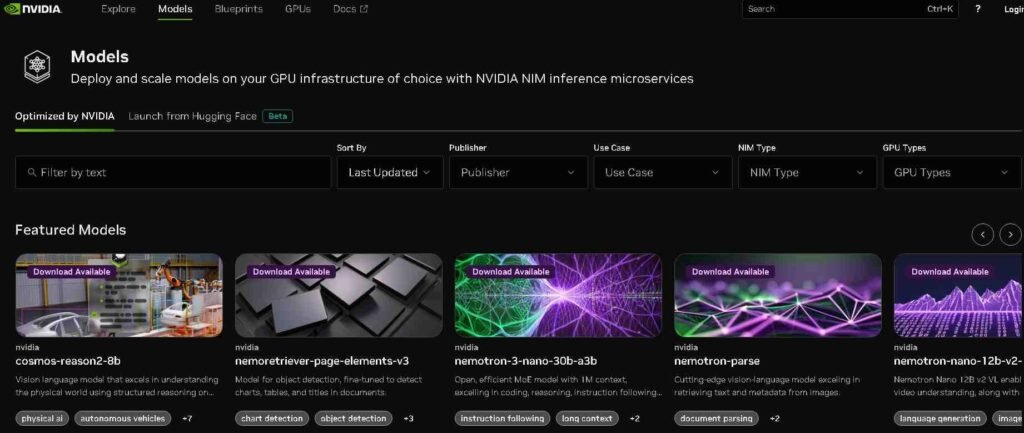
NVIDIA’s developer tooling includes a path to free API keys for a range of well-known models. The experience is straightforward: you pick a model, generate a key, then copy it into your app.
Picking a model in the NVIDIA catalog
Start by browsing the Models area. You’ll see a mix of model families and tasks, with options that (depending on what’s available at the time) can include names like:
- Neatron 3
- Openfold
- Qen 30
- Deepseek V3
- KI K2
- Mistral (and other newer additions)
It helps to decide what you’re building before you pick. If you’re testing a chatbot or tool-calling flow, you’ll usually want a general text model first. If you’re doing something research-heavy, you might experiment with a model better suited to that domain.
The main point is that NVIDIA makes it easy to try multiple models, which is perfect when you’re comparing output quality, speed, or style for the same prompt.
Step-by-step: create the API key (and grab ready-to-paste code)
Once you’re ready, the key generation flow is simple:
- Choose the option to get an API key.
- Generate the key.
- Copy the key and store it safely for your project.
There’s also a practical feature that saves time when you’re in build mode. After choosing a model (for example, KI K2), look for a View Code option inside that model’s page. That section can provide a code snippet you can copy and paste, and it also includes a way to generate an API key from the same workflow.
That means you’re not stuck hunting for docs while you’re trying to get a quick test running. You can go from “model picked” to “first request sent” in minutes.
Managing keys so your account stays tidy
If you generate several keys while experimenting, you don’t have to keep them forever. NVIDIA’s UI also lets you delete unused keys, which is worth doing once you’ve finished testing on a device, a repo, or a temporary app environment.
If you want a broader list of places offering free access, the free LLM API resources repository is a strong companion to NVIDIA’s platform because it helps you compare other providers quickly.
Groq: fast inference, simple API key creation, clear usage tracking
Groq is often mentioned for one reason: speed. If you like rapid feedback while testing prompts or building a prototype, Groq’s console makes it easy to experiment in a playground and then move into API usage.
Using the playground to test models first
Inside Groq’s playground, you can chat with models (including Llama and others) before you write any code. This is useful because you can sanity-check prompt formats, tone, and response quality without spending time wiring up a full project.
It’s also a good way to confirm that the model you want is actually the one you should use. Sometimes the “best” model on paper isn’t the best for your specific output style.
Step-by-step: create a free Groq API key
The key flow is quick:
- Click the API key option in the console.
- Choose Create API Key.
- Give the key a name (so you remember what project it belongs to).
- Complete verification (if prompted), then submit.
- Copy the key and add it to your project.
If you later decide you don’t need that key, you can remove it using the delete option. Naming keys clearly helps a lot here because it prevents the “which key is this?” problem later.
Monitoring limits, logs, and more in the dashboard
After you start sending requests, usage visibility matters. Groq provides a dashboard where you can track items like limits, metrics, logs, and batches. That’s especially helpful when you’re running tests, because it tells you whether a slowdown is on your side or if you hit a free-tier cap.
For more ideas on free options people are using in 2026, this roundup can also help: 15 free LLM APIs you can use in 2026.
GitHub Models: free-tier model access with personal access tokens
GitHub has also added a path to try high-quality models through its Models experience. It’s positioned as a free tier option, which makes it attractive for developers who already live inside GitHub workflows.
What to expect from GitHub’s free tier
You’ll see access to multiple model families, including options comparable to popular suites (such as OpenAI-style offerings), plus providers like Mistral and DeepSeek. Because it’s a free tier, you should expect rate limits. That’s not a drawback for learning and prototyping, it’s just something you plan around.
If you want to browse what’s available, the directory sits here: GitHub Models Marketplace listings.
Step-by-step: generate the token you’ll use in code
The GitHub flow uses personal access tokens:
- Pick a model card (the UI typically shows these in the upper-right area).
- Select Use this model.
- Choose Create personal access token.
- Scroll until you find the option to generate the token.
- Give it a unique name, confirm, then generate.
Once it’s created, copy it and store it securely. If you need more than one token (for different projects or scopes), repeat the same process with a new name.
You can also revoke tokens any time. If you’re done with a test project, deleting old tokens is a good habit.
Switching between models without rewriting everything
One practical benefit is that you can pick a different model card and repeat the “use this model” flow. That makes GitHub Models handy for side-by-side comparisons, especially when you’re testing the same prompt across two providers and watching for differences in tone, formatting, and reasoning style.
Google AI Studio: create a Gemini API key tied to a Cloud project
Google AI Studio is a popular place to get started with Gemini, including models that support text, plus options that cover vision and video use cases.
To explore the workspace, start here: Google AI Studio workspace.
Models you can explore (text, vision, and video)
Inside AI Studio, you’ll see a mix of models and capabilities. Depending on what’s available in your region and account, that can include:
- Gemini 2.5 Pro
- Gemini Nano
- Gemini Flash
- Imagen for images
- Veo for video
The value here is range. If your project needs more than text, this is one of the clearer paths for experimenting with multimodal inputs and outputs from one place.
Step-by-step: generate the API key using a Google Cloud project
The key creation flow looks like this:
- Go to the dashboard and select Create API key.
- Link the key to a Google Cloud project.
- If you don’t have one ready, create a new project during setup.
- Once the project is set, create the key.
- Copy the key and integrate it into your app.
If you need to rotate credentials or clean up after a test, you can delete the key just as easily.
A simple way to think about it: the Cloud project is the “container,” and the API key is the “door key” you hand to your app.
OpenRouter: one API key that can access many model providers
OpenRouter is useful when you don’t want to commit to a single model provider from day one. It acts as an aggregator and also helps you compare models by category and performance.
If you want to review OpenRouter basics and model access in a single overview, this directory-style page can be helpful: OpenRouter free model overview.
Why developers like OpenRouter for prototyping
OpenRouter surfaces models from multiple providers (including names you’ll recognize, such as Anthropic and xAI’s Grok), plus other common options like OpenAI-style models and Gemini listings.
It also segments models by modality, such as text and image, which helps when you’re choosing the right tool for the job instead of grabbing whatever is popular this week.
If your project needs to experiment across providers, a unified key reduces setup time. Instead of creating three accounts and managing three billing dashboards, you can start in one place and compare results.
Step-by-step: create an OpenRouter API key
The workflow is simple:
- Go to your OpenRouter dashboard.
- Choose Get API key, then Create API key.
- Name the key so you know where it’s used.
- Optionally set a credit limit (if the UI offers that setting).
- Create the key and copy it into your project.
When you’re done testing, deletion is straightforward too. One key for many models can also mean one place to rotate credentials when you ship.
If you want to explore the platform directly, OpenRouter’s homepage is here: OpenRouter model routing platform.
Cloudflare Workers AI: serverless models by task category
Cloudflare Workers AI is different from the “pick one chatbot model” approach. It focuses on a broad catalog of models organized by tasks, which is handy when your app needs more than text generation.
Cloudflare groups models into categories such as text-to-speech, summarization, embeddings, generation, and object detection. You’ll also see popular model families like Llama included in the catalog.
That task-based organization can save time, because you can start from “what do I need to do?” instead of “which brand name model should I try?”
How to get API access without hunting for settings
Inside the Workers AI docs, there’s a Use API section that includes the code you need. The practical flow is:
- Open the Use API section for the model or task you want.
- Copy the provided snippet and adapt it to your app.
If that approach doesn’t fit your workflow, another option is to use one of the other platforms mentioned earlier, especially if you want a single key that covers multiple providers.
The docs start here: Cloudflare Workers AI documentation.
A shortcut for finding more free LLM APIs (without random searching)
If you’ve ever searched “free LLM API key” and ended up on sketchy pages, you know the problem. There’s a lot of noise, and some “free” options aren’t legitimate.
That’s why the free LLM API resources repository is useful. It calls out legitimate services, and it includes both permanently free options and trial-based credits. It also warns people not to abuse free tiers, which matters because aggressive usage often leads to restrictions for everyone.
If you want extra context and comparisons outside of official docs, these two reads can also give you ideas for what to try next:
FAQ: Free API keys for AI models
Are these API keys really free?
They can be free to generate and free to use within a free tier. Most services still enforce rate limits, quotas, or usage caps, and some include trial credits that run out.
Which platform is best if I want speed?
Groq is commonly used when low latency matters during testing, because you can iterate quickly in the playground and then move into API calls.
Which option is best if I want many models with one key?
OpenRouter is built for that setup. You create one key and then route requests to different models and providers.
Why does GitHub Models use a personal access token instead of a typical API key?
GitHub’s approach fits how GitHub handles access across many developer features. Tokens are also easy to revoke, which helps if you’re testing and rotating credentials often.
Do I need a Google Cloud project to use Google AI Studio keys?
Yes. The key is linked to a Google Cloud project, even if you create that project during setup.
What’s the easiest way to find more legitimate free LLM APIs?
Use a maintained list instead of random search results. The free LLM API resources repository is designed for exactly that.
Conclusion
Free tiers make it realistic to build and test without worrying about a surprise bill. NVIDIA, Groq, GitHub Models, Google AI Studio, OpenRouter, and Cloudflare Workers AI each give you a different path to free API access, depending on whether you care most about speed, model choice, multimodal support, or serverless deployment. Pick one platform, generate a key, and ship a small test feature this week. Once you’ve done that, it’s much easier to decide what’s worth paying for later.