
Let’s Know about How to Create a WordPress Plugin Using Next.js
Modern developers are blending the flexibility of WordPress with the power of Next.js to build fast, scalable, AI-driven tools. But can you really create a WordPress plugin using Next.js?
Yes — with the right architecture.
This in-depth, SEO-optimized guide explains:
- ✅ Production-ready boilerplate structure
- ✅ SaaS-grade plugin architecture
- ✅ Monetizable AI tool plugin blueprint
- ✅ SEO plugin concept built with Next.js
- ✅ FAQs for AEO & GEO optimization
Can You Build a WordPress Plugin with Next.js?
WordPress plugins are built in PHP, while Next.js runs on Node.js. So you cannot replace the PHP core.
Instead, you:
- Build the frontend in Next.js
- Compile/export static files
- Embed them into WordPress via a PHP plugin
- Connect using REST API or GraphQL
This creates a Hybrid Plugin Architecture.
🔥 Production-Ready Boilerplate Structure
Here’s a clean, scalable structure:
wp-next-ai-plugin/
│
├── wp-next-ai-plugin.php
├── includes/
│   ├── api.php
│   ├── admin-menu.php
│   └── license.php
│
├── public/
│   ├── next-app/
│   │   ├── index.html
│   │   ├── _next/
│   │   └── assets/
│
├── assets/
│   ├── css/
│   └── js/
│
└── readme.txt
Core Plugin File (wp-next-ai-plugin.php)
<?php
/**
 * Plugin Name: WP Next AI Plugin
 * Description: AI-powered SaaS plugin built with Next.js
 * Version: 1.0
 */

defined('ABSPATH') || exit;

function wp_next_ai_shortcode() {
    return '<div id="nextjs-root"></div>
            <script src="'.plugin_dir_url(__FILE__).'public/next-app/main.js"></script>';
}

add_shortcode('wp_next_ai', 'wp_next_ai_shortcode');
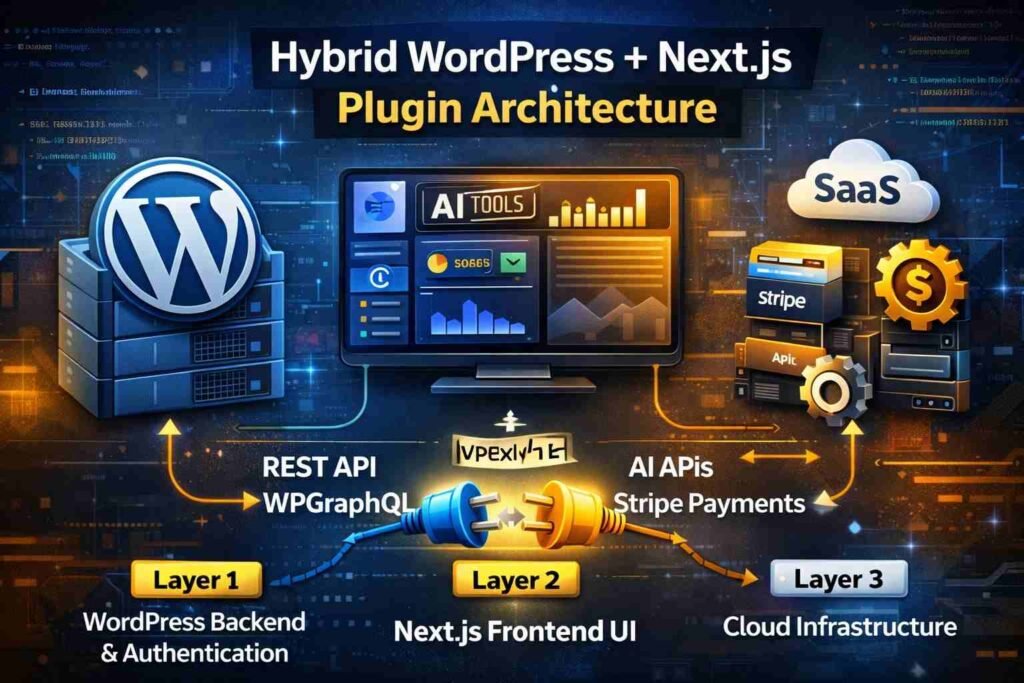
🚀 SaaS-Grade Plugin Architecture
To build a scalable SaaS plugin:
Layer 1: WordPress Backend
- Authentication
- Licensing
- Payment verification
- Data storage
Layer 2: Next.js Frontend
- Dashboard UI
- AI features
- Analytics
- Subscription display
Layer 3: Cloud Infrastructure
- AI APIs
- Stripe payments
- Serverless functions
- Edge caching
Recommended Stack
- WordPress (backend CMS)
- Next.js (frontend UI)
- REST API / WPGraphQL
- Stripe for billing
- Redis cache
- VPS or cloud hosting
💰 Monetizable AI Tool Plugin Blueprint
Here’s a blueprint to build a revenue-generating plugin.
Example: AI SEO Content Optimizer Plugin
Features:
- AI title generator
- Meta description creator
- Keyword density checker
- Content score analyzer
- Schema generator
Monetization Strategy
1. Freemium Model
- Free: 5 AI generations per day
- Pro: Unlimited usage
2. Subscription Model
- ₹999/month Basic
- ₹2999/month Pro
3. Pay-Per-Credit Model
- 100 AI credits package
Payment Flow
- User upgrades plan
- Stripe processes payment
- License key generated
- Plugin verifies via API
- Next.js dashboard unlocks features
🤖 AI Integration Example
Inside Next.js:
async function generateSEO(text) {
  const response = await fetch('/api/ai', {
    method: 'POST',
    body: JSON.stringify({ content: text })
  });
  return response.json();
}
Server endpoint connects to:
- OpenAI
- Claude
- Gemini
📈 SEO Plugin Built with Next.js (Concept Model)
Let’s design a next-gen SEO plugin.
Plugin Name: NextSEO AI
Core Modules
1️⃣ Real-Time SEO Score
Analyzes:
- Keyword placement
- Heading structure
- Internal linking
- Image alt tags
2️⃣ SERP Preview Generator
Live Google preview simulation.
3️⃣ Schema Generator
Auto JSON-LD for:
- Article
- FAQ
- Product
- Review
4️⃣ AI Content Suggestions
Suggest:
- NLP keywords
- LSI terms
- Internal links
Why Next.js Makes It Powerful
- React-based interactive UI
- Real-time scoring
- Instant updates
- Modern dashboard experience
Unlike traditional plugins, this feels like SaaS software.
⚙️ Deployment Workflow
Step 1
Build Next.js:
npm run build
npm run export
Step 2
Copy /out folder into plugin directory.
Step 3
Activate plugin in WordPress.
Step 4
Use shortcode:
[wp_next_ai]
🧠 GEO & AEO Optimization Strategy
To optimize for AI engines:
- Use structured headings (H2, H3)
- Include direct answers
- Add FAQ schema
- Clear technical definitions
- Avoid fluff
⚡ Performance Best Practices
- Use static export
- Enable lazy loading
- Minify assets
- Use CDN
- Cache API responses
- Avoid heavy client-side rendering
🏆 Advantages of This Approach
✅ Enterprise-level UX
✅ SaaS monetization ready
✅ AI integration friendly
✅ High scalability
✅ Future-proof architecture
⚠️ Limitations
- More complex than PHP plugin
- Requires build process
- Not ideal for small features
Frequently Asked Questions (SEO & AEO Optimized)
1. Can Next.js fully replace WordPress plugin development?
No. WordPress plugins require PHP, but Next.js can power the frontend UI.
2. Is this architecture SEO friendly?
Yes, if you use static export or SSR and optimize metadata correctly.
3. Do I need Node.js hosting?
Only during development. Static export works on shared hosting.
4. Can I build a SaaS business using this method?
Yes. This architecture supports subscriptions, licensing, and cloud APIs.
5. Is this suitable for beginners?
No. This is best for intermediate to advanced developers.
Final Verdict
Building a WordPress plugin using Next.js is not just possible — it’s a powerful strategy for 2026.
If you’re building:
- AI tools
- SaaS dashboards
- SEO optimization software
- Monetizable tech products
Then combining WordPress + Next.js gives you performance, scalability, and future-ready infrastructure.
For simple plugins, stick with PHP.
For advanced tools and monetization — go hybrid.
If you like to Explore Ai tool’s Directory Go here: AiZonet